Specifically, the Postgres flavor. But how different can it really be?
Postgres is ACID:
- Atomicity: all or none
- Consistency: will always follow schema
- Isolation: Transactions won’t interfere with each others half-finished work (concurrency race conditions basically)
- Durability: Transactions committed are permanent. Can’t be wiped from RAM (WAL: write ahead log)
https://neon.com/postgresql/postgresql-tutorial/postgresql-select
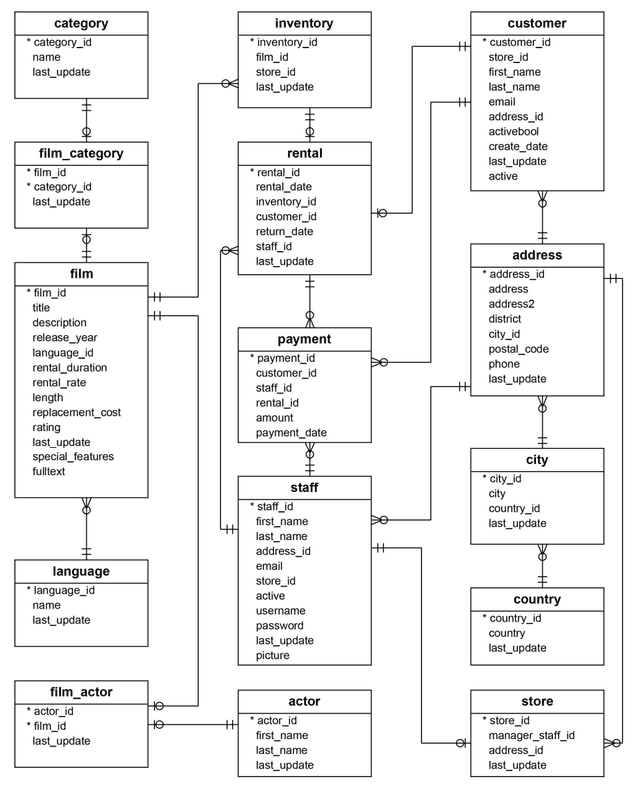
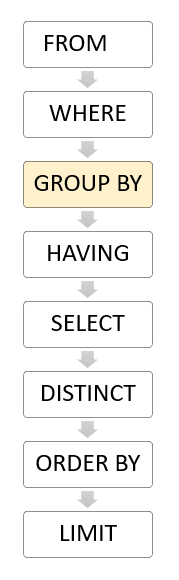
Order of Execution
FROM => WHERE => SELECT => ORDER BY
Syntax
Semicolon ended
* usually means EVERYTHING… all columns, etc
" usually for SQL syntax
' for SQL strings
NULL for… null data?
Functions / Operators
|| for concatenation
Boolean Operators
| Operator | Description |
|---|---|
| = | Equal |
| > | Greater than |
| < | Less than |
| >= | Greater than or equal |
| <= | Less than or equal |
| <> or != | Not equal |
| AND | Logical operator AND |
| OR | Logical operator OR |
| IN | Return true if a value matches any value in a list |
| BETWEEN | Return true if a value is between a range of values |
| LIKE | Return true if a value matches a pattern. % to match any sequence of 0 or more characters, _ matches any single character. Use ESCAPE ‘escpae_char’ if you need to. |
| IS NULL | Return true if a value is NULL. MUST BE USED OVER == NULL |
| NOT | Negate the result of other operators |
Aliases
You can alias tables and columns. Yea. Use AS. Column aliases don’t need AS (optional)
SELECT
SELECT
	col_1, col_2, ...
FROM
	table_name;
You can use aliases. expr AS col_alias, or just expr col_alias
You can use SELECT DISTINCT to select for distinct… values
You can use SELECT to retrieve a function result.
ORDER BY
To sort the result of selects usually
SELECT ...
ORDER BY
	sort_expr1 [ASC | DESC] [NULLS FIRST | NULLS LAST],
	sort_expr2 [ASC | DESC] [NULLS FIRST | NULLS LAST],
	...;
Expression can be a column, function, etc
WHERE
SELECT ...
WHERE
	condition
Because of order, WHERE clauses cannot use colum aliases from select.
Check out Functions / Operators
LIMIT
ORDER BY...
LIMIT
	row-count;
or

LIMIT
	row_count
OFFSET
	row_to_skip;
Theres stuff about FETCH but i don’t really care
JOIN
Ahh, fantastic SQL operations. JOINS combine table, oftentimes used for combining foreign keys with primary keys.
FROM
	table_name
[TYPE] JOIN another_table
	ON condition
There are many types of JOINS.
Inner Joins
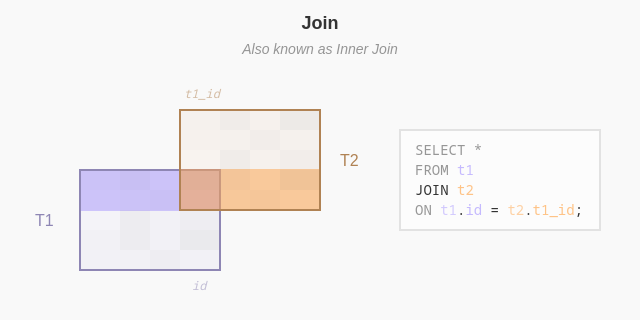
Like a venn diagram, combines only the rows that meet the condition.
Left/Right Join
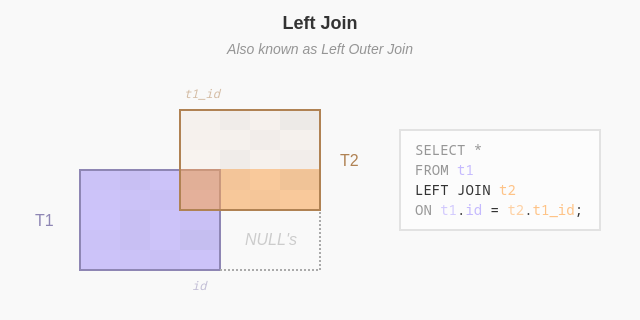
Like a venn diagram, contains one circle and the middle portion.
Takes everything from left/right, and any common elements will be JOINED. Any ones that don’t will be filled with NULLS
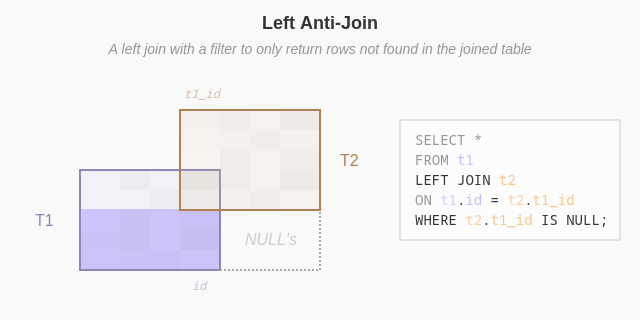
Left/Right Anti-Join (OUTER JOIN)
Removing the shared bit. OUTER JOIN does the same, but im guessing it isnt SQL standard
FULL JOIN
Pretty obvious by now… everything, padded with NULLS
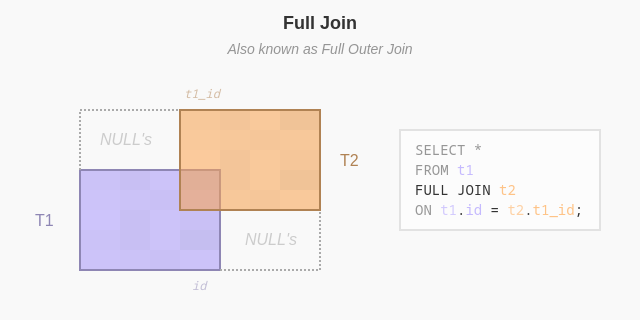
And theres full outer join.. which u can guess.
CROSS JOIN
Takes a row of m, matches it with every possible row of n. Results in m * n
NATURAL JOIN
TODO!
UNION ALL
Just adds literally select statements to each other.
Grouping Data
GROUP BY
SELECT
   column_1,
   column_2,
   ...,
   aggregate_function(column_3)
FROM
   table_name
GROUP BY
   column_1,
   column_2,
   ...;
Divides them into groups, then you can aggregate each group.
If multiple values are involved, then it calculates for each group (a, b). More on that in Grouping Sets
HAVING
Basically like a “where” - but instead of filtering rows, filter groups of rows. Due to the Order of Execution, aliases in the SELECT cannot be used in HAVING. Unfortunate.
Grouping Sets
A set of columns that you group using GROUP BY. Lets say you have a Brand, Size. Perhaps you want to get all possible grouping sets (like (brand), (size), (brand, size), ()). This would help analyze sum of all sales, sum of all sales from a brand, from a size, and all sales.
One can use a UNION ALL, but it is inefficient. POSTGRES gives you a GROUPING SETS. for that
SELECT
    c1,
    c2,
    aggregate_function(c3)
FROM
    table_name
GROUP BY
    GROUPING SETS (
        (c1, c2),
        (c1),
        (c2),
        ()
);
You can also use GROUPING, to check if that column is being affected by the grouping set.
GROUPING(column_name | expr )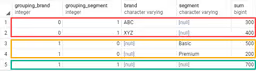
CUBE
Rollup
Set Operations
You can use these to combine queries.
UNION, INTERSECT, EXCEPT.
Modifying Data
INSERT
INSERT INTO table_name(col1, col2)
VALUES (val1, val2), (another_val1, another_val2)
Postgres returns command tag: INSERT oid count. OID is object identifier, count is number of rows. You can insert multiple rows, recommended for atomicity! Also more efficient.
You can add a RETURNING clause to get it to return data
INSERT INTO table_name(col1, col2)
VALUES (val1, val2)
RETURNING *;
UPDATE
UPDATE table_name
SET col_1 = val_1,
	col_2 = val_2,
	...
WHERE condition;
WHERE is optional - but if you don’t, it’l update all of them! Returns UPDATE count.
Same as INSERT, you can use a RETURNING clause
UPDATE Join
Sometimes you need to update data based on another table.
UPDATE table1
SET table1.col1 = new_val
FROM table2
WHERE table1.c2 = table2.c2
DELETE
DELETE FROM table_name
WHERE condition;
If you omit WHERE, it deletes everything!
Same as UPDATE, you can add RETURNING, you can add a JOIN. However, syntax is a bit different
DELETE Join
DELETE FROM table1
USING table2
WHERE condition
RETURNING ...;
You can also use Subqueries
DELETE CASCADE
Basically means that when parent is deleted, all children (linked via foreign keys) are also gone.
UPSERT
Update / insert. VERY IMPORTANT FOR ATOMICITY. Basically inserts if not existing, update if it does.
INSERT INTO table_name (column1, column2, ...)
VALUES (value1, value2, ...)
ON CONFLICT (conflict_column)
DO NOTHING | DO UPDATE SET column1 = value1, column2 = value2, ...;table_name: This is the name of the table into which you want to insert data.(column1, column2, ...): The list of columns you want to insert values into the table.VALUES(value1, value2, ...): The values you want to insert into the specified columns(column1, column2, ...).ON CONFLICT (conflict_column):This clause specifies the conflict target, which is the unique constraint or unique index that may cause a conflict.DO NOTHING: This instructs PostgreSQL to do nothing when a conflict occurs.DO UPDATE: This performs an update if a conflict occurs.SET column = value1, column = value2, ...: This list of the columns to be updated and their corresponding values in case of conflict.
Newer, in POSTGRES: MERGE
MERGE
MERGE INTO target_table
USING source_table
ON match_condition
WHEN MATCHED AND condition THEN
    UPDATE SET column1 = value1, column2 = value2
WHEN MATCHED AND NOT condition THEN
    DELETE
WHEN NOT MATCHED THEN
    INSERT (column1, column2) VALUES (value1, value2)
RETURNING merge_action(), target_table.*;-
target table: the one to modify
-
source table: table with new data
-
match condition: rule for matching
-
Update rows: If a match is found (
ON match_condition) andconditionis true, it updatescolumn1andcolumn2intarget_table. -
Delete rows: If a match is found but
conditionis false, it deletes the matching rows intarget_table. -
Insert rows: If no match is found, it inserts new rows into
target_tableusing values fromsource_table. -
The
RETURNINGclause provides details of the operation (merge_action()) and the affected rows.
RLS
Row-Level security - adding auth to the database.
ALTER TABLE table_name
ENABLE ROW LEVEL SECURITY;
Then, you’d need a policy.
CREATE POLICY name ON table_name
USING (condition);
Random
Casting - ::
Common Table Expression
Literally postgres “functions”. You can break down expressions into snippets that can be reused.
WITH cte_name (column1, column2, ...) AS (
    -- CTE query
    SELECT ...
)
-- Main query using the CTE
SELECT ...
FROM cte_name;
Explained:
WITHThe “def” of CTEcte_name: the nameColumn List (optional): List of columns. If not specified, will inherit from the SELECT statement.AS: Starts the body
It can be recursive!! todo